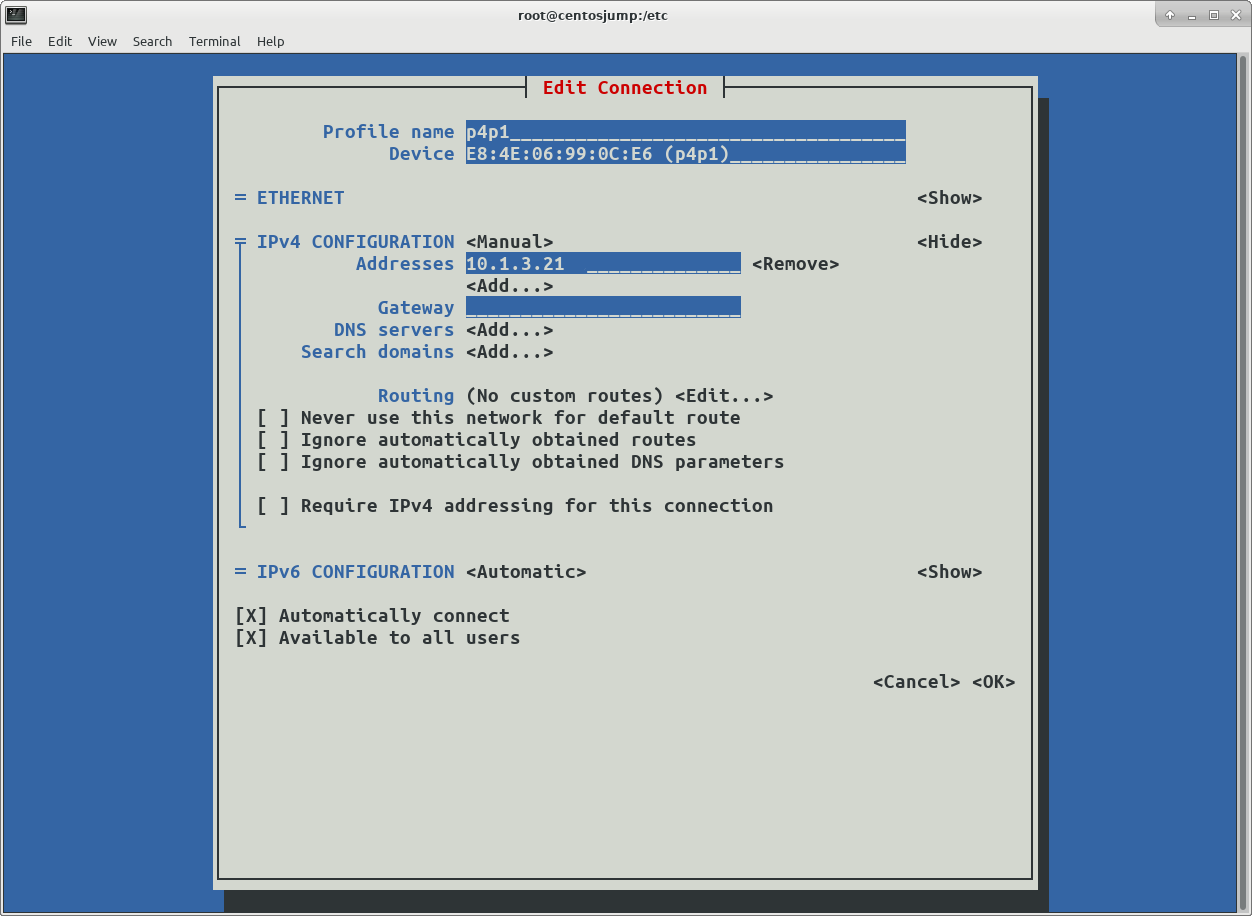
 -- Run ifconfig-a or ip addr show
The NIC should now have an IP assigned to it.
...if not ifup <NIC NAME>.
03) Create IFACE
iscsiadm --m iface -I <NIC NAME> --o new
04) Do discovery ( the specific iface for the network interface must be used )
/sbin/iscsiadm -m discovery -d 5 -t st -p 10.1.3.1:3260 -I <NIC NAME>
# Note the iqn, ip and port's that are returned. They will be needed for the login
# Now iscsi should start
/usr/bin/systemctl start iscsi
/usr/bin/systemctl status iscsi
05) Check Session
/sbin/iscsiadm -m session -R
06) Login ( reference iqn, ip, and port returned by the 04) discovery )
/sbin/iscsiadm --mode node -I enp0s20f0u2 --targetname iqn.2015-10.com.dell:dellemc-powerstore-apm00214412368-a-3432b5e3 -p 10.1.3.3,3260
/sbin/iscsiadm --mode node -I enp0s20f0u2 --targetname iqn.2015-10.com.dell:dellemc-powerstore-apm00214412368-b-0b2e34c4 -p 10.1.3.2:3260
cd /var/lib/iscsi/
cd nodes
find . -name <NIC NAME> -print
vi the files that are found,
change manual to automatic.
systemctl restart iscsid
systemctl restart iscsi
fdisk -l
# Look for disks with the size that was requested...
-- Run ifconfig-a or ip addr show
The NIC should now have an IP assigned to it.
...if not ifup <NIC NAME>.
03) Create IFACE
iscsiadm --m iface -I <NIC NAME> --o new
04) Do discovery ( the specific iface for the network interface must be used )
/sbin/iscsiadm -m discovery -d 5 -t st -p 10.1.3.1:3260 -I <NIC NAME>
# Note the iqn, ip and port's that are returned. They will be needed for the login
# Now iscsi should start
/usr/bin/systemctl start iscsi
/usr/bin/systemctl status iscsi
05) Check Session
/sbin/iscsiadm -m session -R
06) Login ( reference iqn, ip, and port returned by the 04) discovery )
/sbin/iscsiadm --mode node -I enp0s20f0u2 --targetname iqn.2015-10.com.dell:dellemc-powerstore-apm00214412368-a-3432b5e3 -p 10.1.3.3,3260
/sbin/iscsiadm --mode node -I enp0s20f0u2 --targetname iqn.2015-10.com.dell:dellemc-powerstore-apm00214412368-b-0b2e34c4 -p 10.1.3.2:3260
cd /var/lib/iscsi/
cd nodes
find . -name <NIC NAME> -print
vi the files that are found,
change manual to automatic.
systemctl restart iscsid
systemctl restart iscsi
fdisk -l
# Look for disks with the size that was requested... MULTIPATH #Create a minimal multipath.conf vi /etc/multipath.conf systemctl start multipathd.service systemctl status multipathd.service /usr/sbin/multipath -ll mpathb (368ccf098001e57427bf627fd34fe1030) dm-2 DellEMC ,PowerStore size=256G features='1 queue_if_no_path' hwhandler='0' wp=rw |-+- policy='queue-length 0' prio=50 status=active | `- 4:0:0:1 sdb 8:16 active ready running `-+- policy='queue-length 0' prio=10 status=enabled `- 5:0:0:1 sdc 8:32 active ready running # Add an entry like this to /etc/multipath.conf in the multipaths section for each LUN # For ease of identity I am UPPERCASE'ing the alias for the PowerStore to match the replacement for the Compellent. multipath { wwid "368ccf098001e57427bf627fd34fe1030" alias "CDB" } systemctl restart multipathd.service /usr/sbin/multipath -ll ## should return the WWID with mpath<letter> to alias declared in multipath.conf
defaults { user_friendly_names yes disable_changed_wwids yes } devices { device { vendor DellEMC product PowerStore path_selector "queue-length 0" path_grouping_policy group_by_prio path_checker tur detect_prio yes failback immediate no_path_retry 3 rr_min_io_rq 1 fast_io_fail_tmo 15 max_sectors_kb 1024 ##only for RHEL 6.9 (or later 6.x versions) and RHEL 7.4 (or later) } device { vendor "COMPELNT" product "Compellent Vol" no_path_retry queue path_selector "round-robin 0" failback immediate } } blacklist { devnode "^(ram|raw|loop|fd|md|dm-|sr|scd|st)[0-9]*" devnode "^hd[a-z]" ## devnode "sda" device { vendor COMPELNT product "Compellent Alu" } } ## other devices ### ################################################### ### Get the WID for the aliased disk ### /sbin/multipath -l ### ### See info for the raw devices as well ### /sbin/multipath -ll ### mpathb (368ccf098001e57427bf627fd34fe1030) ### ################################################### blacklist_exceptions { wwid "368ccf098001e57427bf627fd34fe1030" ### COMPELLENT wwid "36000d310012668000000000000000080" wwid "36000d31001266800000000000000007e" wwid "36000d31001266800000000000000007f" wwid "36000d31001266800000000000000009a" wwid "36000d3100126680000000000000000a5" } multipaths { multipath { wwid "368ccf098001e57427bf627fd34fe1030" alias "CDB" } ### COMPELLENT multipath { wwid "36000d310012668000000000000000080" alias "cdb" } multipath { wwid "36000d31001266800000000000000007e" alias "cdc" } multipath { wwid "36000d31001266800000000000000007f" alias "cdd" } multipath { wwid "36000d31001266800000000000000009a" alias "cde" } multipath { wwid "36000d3100126680000000000000000a5" alias "cdf" } }